
Multi-Timeframe Trend
1m to 1d, each marked up, down or sideways. See alignment at a glance instead of flipping charts.
TradeMap analyses your TradingView chart and brings key levels, trend, momentum, volume, market structure and other technical information into one clear view.
Free tier included, no time limit
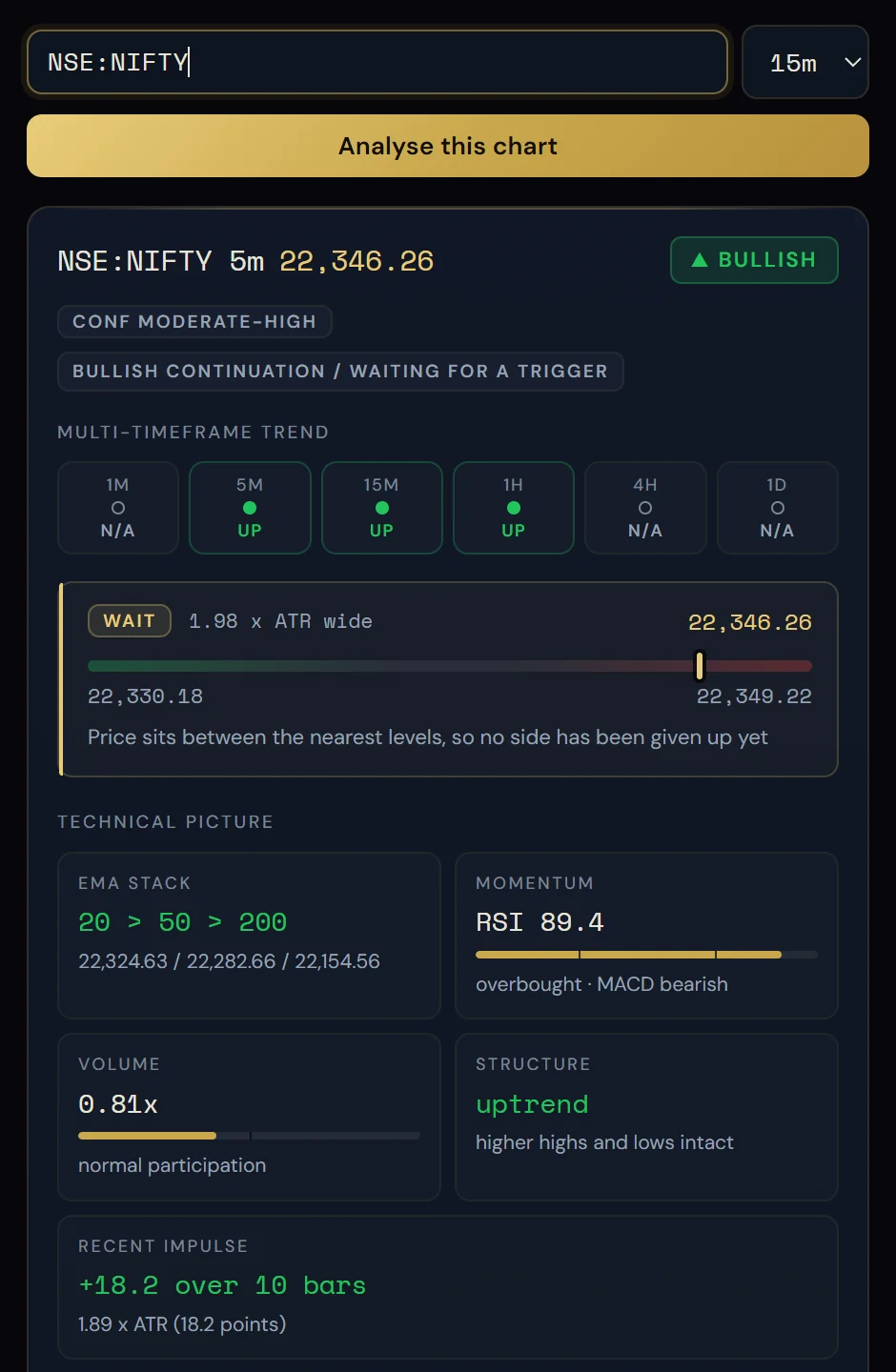
TradeMap reads the TradingView chart in front of you and states what it has found: which way each timeframe points, where price stands, the levels either side, and what would confirm or break the read.
Candles, overlays and indicators across timeframes you would otherwise flip through one by one.
The engine reads the chart's own series data — not pixels — and does the arithmetic locally.
Trend, bias, levels and conditions laid out in one panel, with the reasoning behind each.
There is nothing to configure and nothing to start. TradeMap works on the chart you already have open.
Add TradeMap from the Chrome Web Store, then pin it from the puzzle-piece icon in Chrome's toolbar — Chrome hides new extensions.
Go to any TradingView chart and click the TradeMap icon. Drag the panel by its title bar somewhere clear of the candles.
Press "Analyse this chart". TradeMap reads the chart's series data and builds every timeframe it can derive.
Every timeframe, the levels and the reasoning — in one panel. Hover the confidence to see each point that built it.
TradeMap reads the TradingView chart in front of you and states what it has done: which way each timeframe points, where price stands, the levels either side, and what would confirm or break the read. The analysis is arithmetic — no model, no machine learning, no price feeds. The engine runs inside the extension, so your chart never leaves the browser.
1m to 1d, each marked up, down or sideways. See alignment at a glance instead of flipping charts.
Higher highs and lower lows read from confirmed swing points, per timeframe. When there are not enough swings, it says "unclear".
Support and resistance from fractal pivots, clustered and ranked by how many times each has been touched, with the distance in pips (or points) and in ATR.
RSI and MACD read into the card, with plain labels such as overbought, oversold, MACD bullish or bearish.
The 20 / 50 / 200 EMA stack and the recent impulse measured in ATR, so the direction comes with its numbers.
Current volume shown against normal participation, as part of the evidence behind the bias.
Bias, how strong the evidence is, and why: moving averages, RSI, MACD, recent impulse in ATR, volume. Hover the confidence to see every point that built it.
What would confirm the read, what would weaken it, and the zone where there is nothing to do yet.
A full prose reading, plus the fact sheet — every number behind the card — and precedent figures from earlier instances on the same chart.
The free tier is not a countdown. Trend, bias, confidence and structure keep working for as long as you use it.
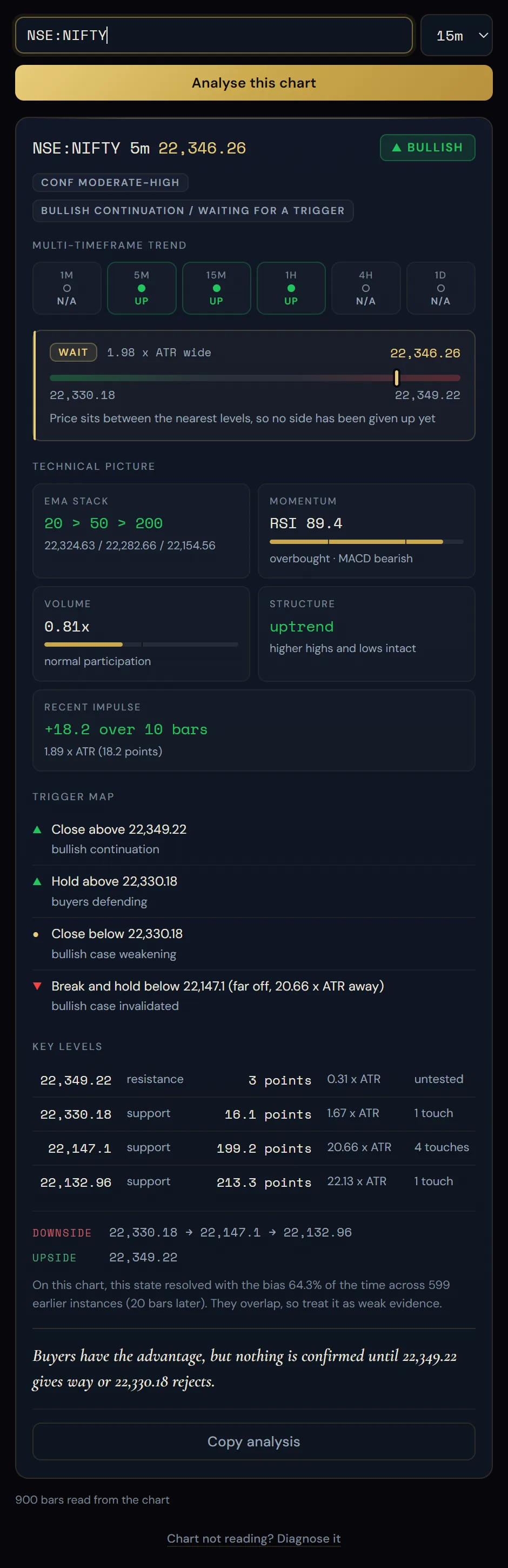
Try TradeMap Free →This is an actual TradeMap panel reading NSE:NIFTY. Hover a point on the right to find it in the panel.
 1234567891011
The overall read for the chart — here BULLISH. Other reads show NEUTRAL or CONFLICTED when timeframes disagree.
How strong the evidence is — CONF MODERATE-HIGH — with the state underneath: bullish continuation, waiting for a trigger.
Up, down or flat for each timeframe from 1m to 1d. Timeframes that can't be derived from this chart are shown N/A, not invented.
Where price sits between the nearest levels, and how wide that band is in ATR.
20 / 50 / 200 exponential moving averages and their order, with the values.
RSI 89.4, labelled overbought, alongside the MACD reading.
0.81x — volume relative to normal participation.
Uptrend — higher highs and lows intact, read from confirmed swing points.
The conditions that would confirm, weaken or invalidate the read, each tied to a price.
Support and resistance with distance in points and ATR, and how many times each has been touched.
How this state resolved on earlier instances of the same chart (flagged as weak evidence when they overlap), then a one-line summary.
Three days of full access, then keep the free tier or go Pro. One licence covers up to three browsers, and every plan is a single payment.
The core read on every chart. Not a countdown.
Installs from the Chrome Web Store
7-day refund · UPI, card, netbanking & wallets
7-day refund · UPI, card, netbanking & wallets
7-day refund · UPI, card, netbanking & wallets
| Feature | Free | Pro |
|---|---|---|
| Trend on every timeframe | ||
| Bias and confidence band | ||
| Market structure per timeframe | ||
| Key levels, touch counts, ATR distance | — | |
| Trigger map | — | |
| Full prose reading | — | |
| Fact sheet — every number behind the card | — | |
| Precedent figures | — | |
| Works offline, nothing uploaded |
TradeMap is chart-analysis software. It describes; it does not advise.
Full detail in the privacy policy.
Straight answers about what TradeMap does, what it reads and what it costs.
A Chrome extension that reads the TradingView chart in front of you and states what it has done: which way each timeframe points, where price stands, the levels either side, and what would confirm or break the read. The analysis is arithmetic — no model, no machine learning, no price feeds.
When you press "Analyse this chart", it reads the chart's own series data rather than scraping pixels. Higher timeframes are built by aggregating the bars on screen, and the engine runs inside the extension, so your chart never leaves the browser.
TradingView, on any chart. It works with whatever symbol and timeframe you have open — for forex pairs, distances are shown in pips. Trend is read from 1m to 1d.
No. Data export is a paid TradingView feature, so TradeMap reads the chart's series object instead, which works on a free account. Paid accounts get the export route as a fallback.
Yes, a free one. You sign in on tradflakes.com, not inside the extension, and it is what lets your licence follow you between browsers. It does not give TradeMap sight of your charts.
Higher timeframes are built by aggregating the bars on screen, so a 15m chart gives you 15m and upward. Lower ones cannot be derived — a 15m candle keeps no record of the 1m candles inside it — so they are reported missing rather than invented. Open the 1m chart and the whole ladder fills in.
No. It asks for no broker credentials and no API keys, and it places no orders. It only reads the TradingView tab you are on, when you click the icon.
No. It describes; it does not advise. No entries, no stops, no targets, no predictions. It names the levels and the conditions that would confirm or break a read, and the test suite fails if the wording ever drifts into an instruction.
No. The chart is read in memory, analysed inside the extension and never uploaded or stored. The extension makes no network requests of its own and has no tracking.
What it keeps, in your browser: your last symbol and timeframe, the panel layout, your signed licence and a random ID for this browser, so one licence can cover up to three. Full detail is in the privacy policy at tradflakes.com/privacy.
Everything in Free, plus key levels with touch counts and ATR distance, the trigger map, the full prose reading, the fact sheet (every number behind the card) and precedent figures. You get three days of full access first, then keep the free tier or go Pro.
Every plan is a single payment — nothing renews on its own, so there is nothing to cancel. Purchases come with a 7-day refund, no questions asked. See the refund policy and licence terms on tradflakes.com.
Add TradeMap from the Chrome Web Store, then click the puzzle-piece icon in Chrome's toolbar and pin it. Open any TradingView chart, click the TradeMap icon and press "Analyse this chart".
It says so, and why. A refusal you can act on is recoverable; a confident wrong answer is not.
Analyse your charts with TradeMap.
Beta invites go out in batches — join the list and you are in the next one. We'll email you when it launches.
See our Privacy Policy.
Use your Google account to access all features.
Signing in also subscribes you to our email updates — new articles, the weekly digest and market insights. Unsubscribe in one click from any email, or choose which you get in your profile. See our Privacy Policy and Terms.